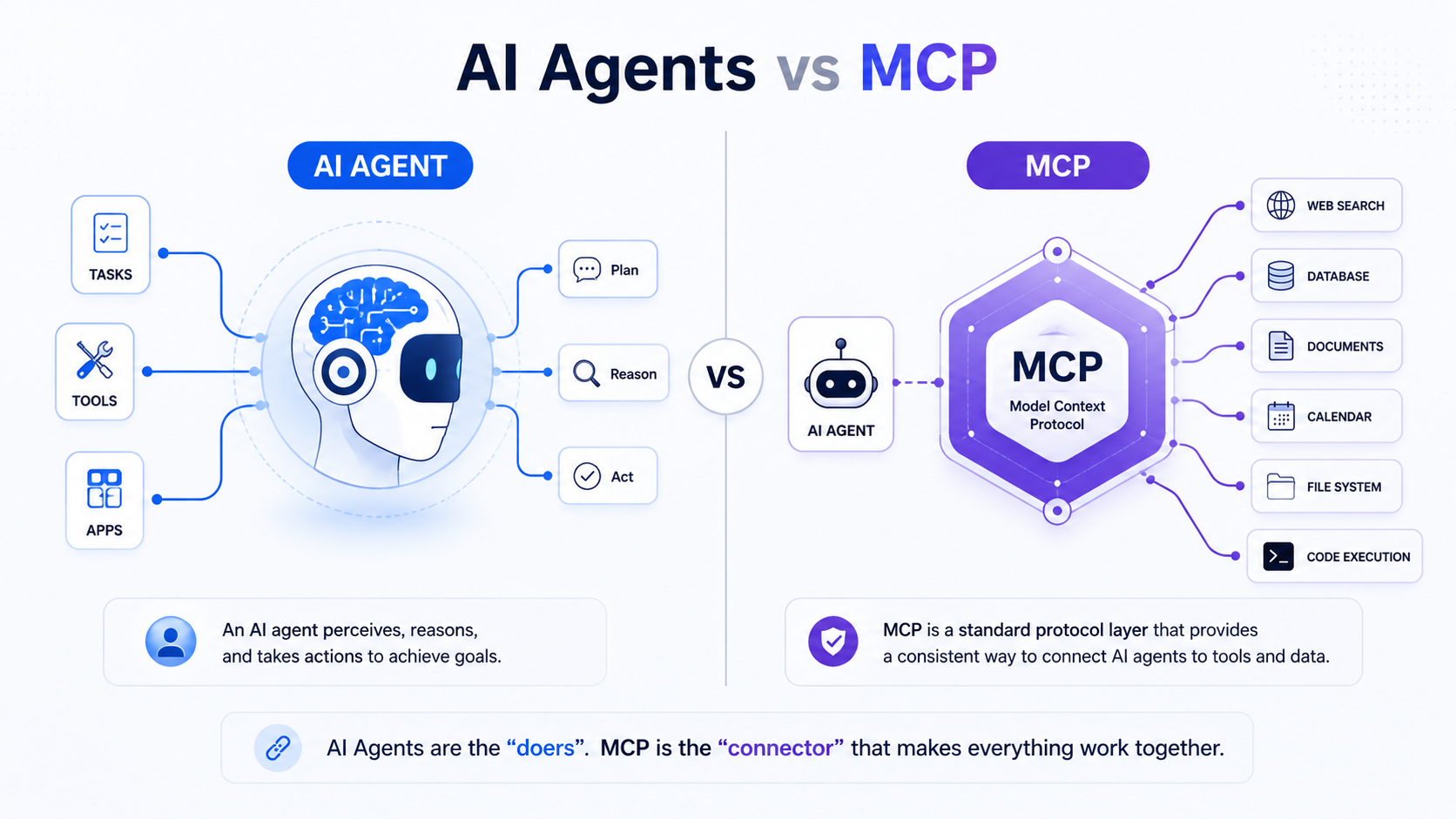
This explainer clears the difference between AI Agents and MCP in simple language.
- AI agent: a system — a built entity that uses an LLM to plan, use tools, and pursue a goal autonomously across multiple steps
- MCP (Model Context Protocol): a standard — an open protocol that defines how AI models connect to external tools, data sources, and services in a consistent, interoperable way
AI agents and MCP are not competing technologies and they are not alternatives to each other. MCP is the infrastructure layer that helps AI agents connect to the outside world. One is a system that thinks and acts. The other is the protocol that defines how that system plugs into everything else. Confusing the two leads to misaligned architecture decisions and overbuilt systems.
3 Key Takeaways
- AI agents are decision-making systems. MCP is the connection standard those systems use to access tools and data. They work together — MCP does not replace agents, and agents do not replace MCP.
- Before MCP, every agent needed custom integration code for every tool it used. MCP solves the N×M problem: instead of building a unique connector for every combination of model and tool, one standard works across all of them.
- MCP is not just for Claude or Anthropic products. OpenAI, Google DeepMind, Cursor, Zed, and thousands of community-built servers now support it, making it the closest thing AI currently has to a universal tool connectivity standard.
Quick comparison — AI agents vs MCP
| Factor | AI Agents | MCP |
|---|---|---|
| What it is | A system — a built entity with reasoning, memory, tools, and an execution loop | A protocol — an open standard for connecting AI models to external tools and data |
| What it does | Plans, decides, acts, and pursues goals autonomously | Standardizes how agents and models request and receive context from external sources |
| Who builds it | Engineers and product teams using frameworks like LangChain, CrewAI, AutoGen | Anthropic (creator), adopted by OpenAI, Google DeepMind, and the open-source community |
| Examples | AutoGPT, Devin, Salesforce Agentforce, custom LangChain agents | MCP servers for GitHub, Slack, Google Drive, Postgres, web browsers |
| How they relate | Agents use MCP to connect to tools. MCP gives agents a standardized way to do it. | Agents use MCP to connect to tools. MCP gives agents a standardized way to do it. |
Why MCP exists — and why it matters now
Before MCP, connecting an AI agent to an external tool — a database, a file system, a CRM — meant writing custom integration code every single time.
Before MCP, developers often had to build custom connectors for each data source or tool. This resulted in what Anthropic described as an “N×M” data integration problem.

The N×M problem works like this: if you have 10 AI models and 20 tools, you need up to 200 custom integrations to connect them all. Every new model or tool added to the system multiplies the problem. The integrations are brittle, non-portable, and expensive to maintain.
MCP addresses N×M problem by providing a universal, open standard for connecting AI systems with data sources, replacing fragmented integrations with a single protocol.
MCP was announced by Anthropic in November 2024 as an open standard for connecting AI assistants to data systems. This includes content repositories, business management tools, and development environments.
The timing was deliberate.
By late 2024, AI agents had moved from research projects to production systems, and the integration problem had become the primary bottleneck stopping teams from scaling them.
In March 2025, OpenAI officially adopted MCP across its products including the ChatGPT desktop app. In December 2025, Anthropic donated MCP to the Agentic AI Foundation, a directed fund under the Linux Foundation, co-founded by Anthropic, Block, and OpenAI. That move signaled MCP’s transition from an Anthropic product to an industry standard.
What is an AI agent?
An AI agent is a software system that uses an LLM as its reasoning core to pursue a goal across multiple steps. For this it uses tools, memory, and a planning loop to decide what to do next without being explicitly instructed at each step.
A practical example: you give an agent the goal “pull last quarter’s sales data, identify the three weakest regions, and draft a summary for the leadership team.” The agent queries a database, reads the results, identifies patterns, and writes the summary — all without you specifying each step.
Four properties are required for something to qualify as an AI agent:
- Goal-directedness: working toward an outcome, not just responding to a single prompt)
- Tool use: calling external capabilities like search or databases)
- Memory: retaining context across steps)
- Autonomous multi-step execution: planning its own sequence of actions rather than waiting for human direction at each step).
What is MCP?
MCP is an open-source standard for connecting AI applications to external systems. Using MCP, AI applications like Claude or ChatGPT can connect to data sources such as local files and databases, tools such as search engines and calculators, and workflows such as specialized prompts — enabling them to access key information and perform tasks.
MCP is not a product. It is not an agent framework. It is a protocol — a set of rules that defines how two systems communicate. MCP is not an agent framework, but a standardized integration layer for agents accessing tools. It complements agent orchestration frameworks like LangChain, LangGraph, and CrewAI, but does not replace them. MCP does not decide when a tool is called and for what purpose — the LLM determines which tools to call based on the context of the user’s request.

The USB-C analogy is the most accurate shorthand: MCP is doing for AI models what the USB-C standard cable did for devices. Just like USB-C makes it easier to connect any device to any peripheral, MCP makes it easier to connect any AI model to any data source or tool regardless of where they’re hosted.
What does MCP actually do technically?
MCP uses a client-server model. The AI application — the agent, or Claude Desktop, or Cursor — is the MCP client. The external tool or data source is the MCP server. The client sends requests in a standardized format. The server responds with data or executes an action and returns the result.
The MCP client-server model can be broken down into three key architectural components: an AI application that receives user requests and seeks access to context through MCP; a client that contains the orchestration logic and connects to servers; and MCP servers that expose tools, data, and prompts in a standardized format.
MCP defines three core primitives — the building blocks of every MCP interaction:
- Resources: data the model can read — files, database records, documents, API responses
- Tools: actions the model can execute — running code, sending a message, querying a database, updating a record
- Prompts: reusable prompt templates stored on the MCP server that the model can call by name
What can an MCP server connect to?
Any tool or data source can expose an MCP server. Current examples include file systems, relational databases, web browsers, code execution environments, GitHub repositories, Slack workspaces, Google Drive, calendar and email tools, CRMs like Salesforce, and REST APIs. There are currently tens of thousands of MCP servers available, all for different tasks, challenges, and tools — many curated and searchable on marketplace-style directories such as MCP.so.
What is the difference between AI agents and MCP?
The clearest statement of the difference: AI agents are the decision-making layer. MCP is the connection layer. An agent decides what to do. MCP defines how the agent reaches the tools it needs to do it.
An agent without MCP still works — it just needs custom integration code for every tool it uses. MCP without an agent is just a protocol sitting idle — it has no reasoning ability, no goals, no memory. The two are complementary, not competing.
The relationship — agent as client, MCP as protocol

In a system that uses both, the relationship is straightforward. The agent is always the client. MCP servers are always the data sources or tools the agent needs to reach. The agent never becomes an MCP server and the MCP server never becomes an agent.
When the agent needs to use a tool — read a file, query a database, run a search — it sends an MCP-formatted request to the relevant MCP server. The server handles the request and returns a structured result. The agent reads that result, incorporates it into its reasoning, and decides what to do next.
End-to-end flow — how an AI agent uses MCP

Here is a concrete step-by-step walkthrough of an AI agent using MCP to complete a research task:
- User gives goal: “Find the three most cited papers on transformer attention mechanisms published in 2024, summarize each one, and identify common themes.”
- Agent plans steps: the agent’s planning layer breaks the goal into sub-tasks — search for papers, retrieve full text, summarize each, compare summaries, extract themes.
- Agent selects tool: the agent determines it needs a web search tool and a document reader. It identifies the relevant MCP servers for each.
- Agent sends MCP request: the agent sends a structured MCP request to the web search MCP server — query, parameters, response format.
- MCP server executes and returns: the search MCP server runs the query against its connected search index and returns a structured list of results including titles, URLs, and abstracts.
- Agent continues reasoning: the agent reads the results, selects the three most relevant papers, and sends a second MCP request to the document reader MCP server to retrieve full text from each URL.
- Agent evaluates and adjusts: one document returns a paywall error. The agent detects this, tries an alternative source via the same MCP server, and retrieves the abstract instead.
- Goal reached: the agent summarizes all three papers using its own reasoning (no MCP call needed for writing), compares the summaries, extracts common themes, and returns the final output to the user.
MCP handled steps 4 and 5 — and the retry in step 7. The agent handled everything else.
MCP vs APIs vs plugins — what’s the difference?
This is the most common confusion point. MCP, APIs, and plugins all connect AI systems to external tools — but they work at different levels of abstraction and solve different problems.

API (Application Programming Interface): a raw interface exposed by a tool or service. An API defines what requests you can make and what responses you’ll get back. To use an API in an agent, you write custom integration code — authentication, request formatting, error handling, response parsing — specific to that API. Every new API requires new custom code. APIs are the underlying mechanism. They don’t standardize anything across different services.
Plugins and tool integrations: predefined connections built for a specific platform. OpenAI’s plugin system, for example, let ChatGPT connect to specific third-party services through connectors built to OpenAI’s specification. The problem: those connectors only work within that platform. A plugin built for ChatGPT doesn’t work in Claude or Cursor. They’re platform-specific and non-portable.
MCP: a standardized protocol layer that sits on top of APIs. MCP builds on existing concepts like tool use and function calling but standardizes them, reducing the need for custom connections for each new AI model and external system. An MCP server wraps an API or tool and exposes it in a consistent format that any MCP-compatible agent can call. You build the MCP server once. Any agent that speaks MCP can then use it — Claude, ChatGPT, Cursor, a custom LangChain agent. The integration is portable.
The practical distinction: MCP is not an API. It uses APIs underneath, but it adds a standardization layer on top that makes tool connections reusable across models, agents, and platforms. An API answers the question “how do I talk to this specific service?” MCP answers the question “how do any AI systems talk to any service in a consistent way?”
How they differ architecturally
An AI agent has four core architectural components: a planner (the reasoning layer that breaks goals into steps), memory (context retained within and sometimes across sessions), a tool layer (connections to external capabilities), and an execution loop (the plan → act → observe → adjust cycle that runs until the goal is reached).
MCP sits inside the tool layer. It is not a replacement for any of the other components. The planner still decides which tool to call and when. Memory still tracks what has happened across steps. The execution loop still drives the overall process. MCP only standardizes the mechanism by which the tool layer connects to external systems.
Without MCP, the tool layer is a collection of custom integrations — each one written specifically for one tool, maintained separately, and non-portable across agents or platforms. With MCP, the tool layer becomes a standardized interface that any MCP server can plug into.
AI agent stack — with MCP vs without MCP
| Layer | Without MCP | With MCP |
|---|---|---|
| Tool integration | Custom code written per tool | Standardized MCP server, reusable across agents |
| Portability | Low — integrations tied to one agent or platform | High — any MCP-compatible agent uses any MCP server |
| Development effort | High — write and maintain custom code for each tool | Lower — build one MCP server, reuse everywhere |
| Maintenance | Fragmented — each integration breaks independently | More centralized — MCP server updates propagate across all agents using it |
| Vendor lock-in | High — integrations often platform-specific | Lower — MCP is an open standard not tied to any vendor |
| Error handling | Varies per integration — inconsistent | Structured — MCP defines standard error formats |
Real-world examples — AI agents using MCP

I have highlighted some examples that will help understand adoption for MCP across use cases:
Coding agent using MCP:
A coding agent like Cursor or Claude Code receives the goal “refactor this function to improve performance and run the tests.”
It sends an MCP request to the file system MCP server to read the relevant files. It sends another to the code execution MCP server to run the existing tests, reads the results, makes changes, runs the tests again through MCP, and confirms they pass before returning the refactored code.
Early adopters like Block and development tools companies including Zed, Replit, Codeium, and Sourcegraph worked with MCP. They enabled AI agents to better retrieve relevant information and produce more nuanced and functional code with fewer attempts.
Research agent using MCP:
A research agent is given a competitive analysis task. It uses a web search MCP server to find recent news, a database MCP server to pull internal sales data, and a document reader MCP server to process uploaded competitor reports.
All three tools are called through the same standardized protocol. The agent synthesizes the results without the developer having written three separate custom integrations.
Customer support agent using MCP:
A support agent reads an incoming ticket, sends an MCP request to the CRM MCP server to retrieve the customer’s history, sends another to the ticket system MCP server to check related open issues, drafts a response using its own reasoning, and sends a final MCP request to update the ticket status. Every external action goes through MCP. The agent never touches the underlying APIs directly.
3 common architecture patterns using MCP with agents
Single agent + multiple MCP servers

One agent connects to several MCP servers — search, database, calendar, file system — each handling a different tool domain. This is the most common pattern for purpose-built agents. The agent’s tool layer lists available MCP servers, and the planner selects which one to call based on the task at hand. Good for: customer support agents, research agents, productivity agents with a defined scope.
Multi-agent + shared MCP layer

Multiple specialized agents share the same MCP server infrastructure. A research agent, a writing agent, and a fact-checking agent all connect to the same web search MCP server and the same document reader MCP server. Each agent uses the tools it needs through the same standardized layer. This reduces duplication — you build and maintain one MCP server instead of three separate integrations for the same tool across three agents.
Agent marketplace model

MCP servers function as a plug-and-play library. Agents select from a catalog of available MCP servers based on task requirements — similar to selecting an npm package or a Chrome extension. The reason the MCP space is so vibrant is that people are building their own MCP servers to tackle common challenges, with tens of thousands of servers available across marketplace-style directories. This composable model means an agent’s capabilities can be extended by connecting a new MCP server without changing the agent’s core architecture.
Trade-offs — what MCP changes in real systems
Here’s are some trade offs one must be aware of when adopting MCPs:
Standardization reduces development time significantly
You build one MCP server for a tool and every agent in your system can use it immediately. For teams managing multiple agents across multiple tools, the compounding savings are substantial.
Latency overheads
Abstraction adds a layer between the agent and the raw API, which can introduce latency overhead compared to a direct, optimized API call. For most tasks this is negligible. For high-frequency, low-latency operations — real-time trading systems, sub-second response requirements — the overhead is worth evaluating before committing to MCP.
Portability is the strongest practical advantage.
An MCP server built today works with any MCP-compatible model or agent, including models that don’t exist yet. Direct API integrations are often tied to a specific SDK or platform version and break when either changes.
Ecosystem dependency is the main risk.
If an MCP server for your tool doesn’t exist yet, you have to build it. And if MCP adoption in your specific tool ecosystem is low, the standardization benefit doesn’t materialize. Check MCP server availability for your key tools before committing to an MCP-first architecture.
Security and permissions in MCP
MCP enforces structured permission handling at the protocol level.
Agents request specific scopes of access — read a file, query a table, send a message — rather than getting blanket access to an entire system. Each MCP request is scoped to what was explicitly requested and validated before execution.
This is meaningfully different from direct API calls, which are often loosely controlled.
A poorly configured API integration can give an agent write access to an entire database when it only needs to read one table. MCP’s structured request format makes over-permissioning harder by design.
Sensitive actions — writing files, sending emails, modifying records — can be gated behind explicit human approval steps in the MCP configuration. This is what makes MCP-based agents safer for production deployment than agents making raw API calls with broad permissions.
That said, MCP is not without security risks.
Security researchers released an analysis in April 2025 noting multiple outstanding security issues with MCP, including prompt injection, tool permissions that allow for combining tools to exfiltrate data, and cross-server tool shadowing where a malicious agent intercepts calls made to a trusted server. The protocol’s design prioritizes simplicity and ease over authentication and encryption — which means security implementation responsibility falls on the teams building and deploying MCP servers.
The practical takeaway:
MCP gives you a more structured and auditable permission model than raw API calls, but it is not a security solution on its own. Every access through MCP should be logged, scoped to minimum necessary permissions, and validated for sensitive operations.
When MCP is overkill – when to avoid MCP adoption
MCP is not always the right choice. Skip it when:
Your agent only connects to one tool with a stable API. If you’re building an agent that only ever queries one internal database, writing a direct integration is simpler, faster, and has less overhead than setting up an MCP server.
You’re building an internal-only system with no portability requirements. If the agent will only ever run in one environment with one set of tools and will never need to work with other agents or platforms, MCP’s portability advantage doesn’t apply.
You’re in a performance-critical, low-latency environment. The abstraction layer MCP adds is small but non-zero. Real-time systems with sub-100ms response requirements should evaluate whether MCP’s overhead is acceptable before adopting it.
You’re using a fully managed platform that handles tool connections natively. Platforms like Salesforce Agentforce or Microsoft Copilot Studio manage their own tool integration layers. Adding MCP on top of their native integration system adds complexity without benefit.
You’re in early prototype stage. When speed of building matters more than portability, hardcode the integrations first. Migrate to MCP when the agent is production-ready and the tool set is stable.
MCP ecosystem — where it’s being adopted
MCP addresses a growing demand for AI agents that are contextually aware and capable of pulling from diverse sources. The protocol’s rapid uptake by OpenAI, Google DeepMind, and toolmakers like Zed and Sourcegraph suggests growing consensus around its utility.
Current adoption across major platforms:
- Claude Desktop and Claude API (native MCP support)
- Cursor (MCP for coding agents)
- Zed (MCP for editor-based AI workflows)
- ChatGPT Desktop (MCP support added September 2025)
- Microsoft Semantic Kernel and Azure OpenAI (MCP integration support)
- Google Vertex AI (MCP-powered agent orchestration)
Community-built MCP servers now exist for most major tools: GitHub, Slack, Google Drive, Notion, Postgres, MySQL, web browsers via Playwright and Selenium, Jira, Salesforce, and many more.
The ecosystem is growing fast enough that for most common enterprise tools, you don’t need to build an MCP server — you can connect an existing one.
What vendors mean when they say ‘MCP-compatible agent’
‘MCP-compatible agent’ means the agent can send MCP-formatted requests. It does not guarantee which MCP servers it supports out of the box, whether all three primitives (resources, tools, prompts) are implemented, or how authentication and permissions are handled.
Always ask: which MCP servers does this work with today, and how do I add new ones?
“MCP server for X” means X exposes an MCP interface.
Verify what primitives it supports — some servers only expose tools (actions), not resources (data) or prompts (templates). Also verify whether the server is maintained and what the update cadence is.
“Full MCP support” is the vaguest claim.
Ask whether this means client support, server support, or both. Ask whether all three primitives are implemented. Ask what authentication mechanisms are in place on the server side.
MCP compatibility is a prerequisite for interoperability — not a guarantee of quality, security, or reliability. Those depend entirely on implementation.
5 common mistakes people make with AI agents and MCP
- Thinking MCP is an AI agent framework. MCP doesn’t orchestrate reasoning, manage memory, or run planning loops. It only standardizes how agents connect to tools. LangChain, CrewAI, and AutoGen are agent frameworks. MCP is not.
- Confusing MCP servers with AI agents. An MCP server has no reasoning capability. It receives a request, executes an action or returns data, and sends a structured response. It has no goals, no memory, no planning loop.
- Assuming MCP replaces APIs. MCP uses APIs underneath. It adds a standardization layer on top — it doesn’t remove or replace the underlying API calls.
- Building custom tool integrations when MCP servers already exist. Before writing custom integration code, check MCP.so or the relevant tool’s documentation. For most common tools, an open-source MCP server already exists.
- Using MCP for single-tool, closed systems. If your agent has one tool and will never need portability, MCP adds complexity without benefit. Start with a direct integration and migrate to MCP when the system grows.
When do you need MCP for your agent?
Run through these five questions before deciding:
- Does your agent need to connect to more than one external tool or data source? If yes, MCP’s standardization pays off from the first integration onward.
- Do you want those connections to be reusable across different agents or projects? If yes, building MCP servers once and reusing them is significantly more efficient than custom code per agent.
- Are you building in an ecosystem where MCP servers already exist for your tools? If yes, the setup cost drops to near zero — connect existing servers rather than building from scratch.
- Do you need auditability and structured permission handling on tool access? If yes, MCP’s scoped request model is more robust than raw API calls for compliance-sensitive systems.
- Is portability across AI platforms a requirement? If yes, MCP is the only current standard that gives you genuine model-agnostic tool connectivity.
Mostly yes → MCP is worth the setup overhead. Mostly no → a direct API integration is simpler and faster for your use case.
Where MCP fits in the future of AI systems
MCP’s trajectory points toward becoming the default protocol layer for agent-tool connectivity across the entire AI ecosystem — not just Anthropic’s products. The HTTP analogy is the most instructive: just as HTTP standardized how browsers and web servers communicate and enabled the entire web to be built on a common foundation, MCP could standardize how AI agents communicate with tools and data sources, enabling a composable ecosystem of capabilities that any agent can plug into.
MCP’s aim is to help frontier models produce better, more relevant responses by connecting them to the systems where data lives. This includes content repositories, business tools, and development environments. As that connection layer matures and the MCP server ecosystem grows, the practical result for teams building agents is fewer integration bottlenecks, more reusable infrastructure, and agents that can be pointed at new tools without rebuilding their underlying architecture.
The open governance structure — MCP now sitting under the Linux Foundation with OpenAI and Block as co-founders alongside Anthropic — signals that this is intended to be infrastructure for the industry. This is not a competitive moat for any single company. That makes it a safer foundation to build on than vendor-specific integration standards.
FAQs on MCP vs AI Agents Difference
Who created MCP and when?
Anthropic created and open-sourced MCP in November 2024. In December 2025, Anthropic donated the protocol to the Agentic AI Foundation, a directed fund under the Linux Foundation, co-founded by Anthropic, Block, and OpenAI. MCP is now an industry standard, not an Anthropic product.
Is MCP only for Claude or Anthropic products?
No. OpenAI adopted MCP in March 2025 and added MCP support to ChatGPT apps in September 2025. Google DeepMind, Microsoft, and Zed have also adopted it. MCP is model-agnostic and platform-agnostic by design.
Do all AI agents use MCP?
No. MCP is widely adopted but not universal. Many agents still use direct API integrations or platform-specific tool connections. MCP adoption is growing rapidly but is not yet the default for all agent systems.
Can I build my own MCP server?
Yes. MCP is open-source and building an MCP server is well-documented. FastMCP is a Python framework that simplifies MCP server development significantly. If you have an internal tool or data source you want your agents to access, you can expose it via an MCP server you build yourself.
What’s the difference between MCP and an API?
An API is a raw interface exposed by a specific service — it requires custom integration code every time you use it. MCP is a standardization layer that sits on top of APIs. It defines a consistent format for how any AI model requests data or actions from any tool, so the same protocol works across all integrations rather than requiring custom code per tool.
Is MCP secure?
MCP provides a more structured permission model than raw API calls, with scoped requests and support for human approval gates on sensitive actions. However, security researchers have identified vulnerabilities including prompt injection and tool permission abuse. MCP is not a security solution on its own — implementation quality, server-side validation, and logging practices determine actual security in practice.
What’s the difference between MCP tools and MCP resources?
MCP tools are actions the model can execute — running code, querying a database, sending a message. MCP resources are data the model can read — files, records, documents. Tools change state or perform operations. Resources return information. Both are primitives in the MCP specification, along with prompts — reusable prompt templates stored on the MCP server.
What’s the difference between MCP and LangChain tool integrations?
LangChain is an agent framework — it handles orchestration, memory, and reasoning flow. LangChain’s built-in tool integrations are custom connectors written specifically for LangChain. MCP is a protocol — it standardizes tool connections across any framework. LangChain supports MCP, which means you can use MCP servers as tools inside a LangChain agent. They complement each other rather than competing.
Learn more about AI Agents via frameworks, tool explainers and research papers
Explore explainers on leading AI agent platforms and tools:
- Agentic AI vs AI Agents difference, clearly explained, no jargons
- No-Code Automation vs AI Agents: Differences + Which to Use When?
- Unlock Notion 3.3 Custom Agents Use Cases for Teams
- What is Copilot Cowork? Microsoft’s New AI Agent Explained
- Unlock Team Efficiency with Cursor’s MCP Apps Marketplace For Plugins
- Perplexity Computer: Optimize Multi-Modal AI Productivity
- GitHub Repository Intelligence: GitHub Copilot Gets a Memory
- Google Always On Memory Agent Ends AI Forgetfulness – Learn How
- Enterprise AI Agents Interface in 2026 – Toyota, IBM, S&P Examples
- How Universal Commerce Protocol (UCP) Enables AI Shopping (Google, Shopify)
- Learn Context Engineering: Resource List (Lectures, Blogs, Tutorials)
Twice a month, we share AppliedAI Trends newsletter.
Get SHORT AND ACTIONABLE REPORTS on AI Trends across new AI tools launched and jobs affected due to AI tools. Explore new business opportunities due to AI technology breakthroughs. This includes links to top articles you should not miss, like this ChatGPT hack tutorial you just read.
Subscribe to get AppliedAI Trends newsletter – twice a month, no fluff, only actionable insights on AI trends:
You can access past AppliedAI Trends newsletter here:
This blog post is written using resources of Merrative. We are a publishing talent marketplace that helps you create publications and content libraries.
Get in touch if you would like to create a content library like ours. We specialize in the niche of Applied AI, Technology, Machine Learning, or Data Science.
Leave a Reply