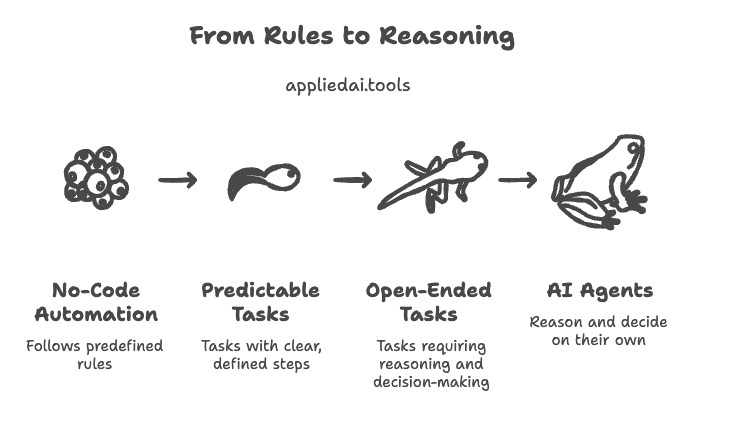
AI agents vs no-code automation: both help you get more done without writing code — but they work in fundamentally different ways.
- No-code automation follows rules you define in advance.
- AI agents reason through problems and decide what to do on their own.
The right choice depends on whether your task is predictable or open-ended — and in most mature workflows, you’ll need both.
Key Takeaways
- No-code automation follows a fixed path you define — it executes reliably but breaks when anything outside its rules appears. AI agents reason toward a goal you define — they handle variable inputs but require more setup and ongoing tuning.
- The choice isn’t binary. Most production workflows benefit from a hybrid approach: no-code handles the structured, repeatable steps while an AI agent handles the parts that need judgment, research, or personalization.
- Before building either, run through five questions: Is the input structured? Do the steps stay the same? Is judgment required? How costly is failure? Do you need an audit trail? Your answers tell you which system — or which combination — fits the task.
Quick comparison — AI agents vs no-code automation
| Factor | No-Code Automation | AI Agents |
|---|---|---|
| Logic | Fixed, rule-based | Goal-based reasoning |
| Flexibility | Low — handles defined scenarios | High — handles variable inputs |
| Reliability | High — predictable outputs | Variable — depends on reasoning quality |
| Setup time | Fast (hours–days) | Moderate to complex (days–weeks) |
| Maintenance | Low — update rules when process changes | Ongoing — prompts, tools, and outputs need tuning |
| Failure handling | Stalls or errors on unexpected inputs | Attempts to adapt and find another path |
| Audit trail | Easy — every step is logged | Harder — reasoning steps need explicit logging |
| Best for | Repetitive, structured, high-volume tasks | Ambiguous, judgment-heavy, multi-step tasks |
What is no-code automation?
No-code automation lets you build automated workflows using visual, drag-and-drop tools — no programming required. You connect apps, define triggers, and set the steps you want the system to follow.
At its core, it works like this:
When X happens → Do Y
Tools like Zapier, Make (formerly Integromat), and n8n are the most widely used examples. A typical workflow might say: “When a new row is added to this Google Sheet, send a Slack message and create a task in Asana.” The system follows that path every time, exactly as designed.
No-code automation is reliable, auditable, and fast to set up. It works best when your process has clear inputs, predictable steps, and consistent outputs.
The hard limit: it can only do what you explicitly tell it to do.
If the situation changes — a field is missing, an edge case appears, a decision needs context — a no-code workflow either fails, skips, or routes to a human. It has no ability to reason its way around a problem.
What is an AI agent?
An AI agent is a system that uses a large language model (LLM) as its reasoning engine to plan, decide, and act — often across multiple steps and tools — in order to reach a goal. Unlike a workflow that follows a fixed path, an agent figures out the path itself.
What this looks like in practice
Goal:
Research the top five competitors in this market, summarize their pricing, and draft a comparison table.
The agent:
- Breaks the goal into steps
- Chooses tools (search, docs, writing)
- Executes tasks
- Evaluates results
- Adjusts if something doesn’t work.
Real-world examples include AutoGPT, Devin (a coding agent), and custom agents built on frameworks like LangChain or CrewAI. Enterprise tools like Salesforce Agentforce and Microsoft Copilot Studio also deploy AI agents for sales and support workflows.
The key property of an AI agent is autonomy.
It doesn’t need a human to specify every step. It reasons about what to do next based on the goal and the results it gets along the way.
What is the core difference between AI agents and no-code automation?
The simplest way to understand this:
- No-code automation = execution
- AI agents = decision-making
The clearest way to see the difference is through decision-making.
No-code automation has no decision-making ability beyond what you hard-code into it. It executes a fixed sequence. If the inputs match what you designed for, it works perfectly. If they don’t, it breaks or skips.
An AI agent makes decisions. It reads the situation, chooses a course of action, uses tools, checks the result, and adjusts. It can handle inputs it has never seen before because it reasons rather than pattern-matches against preset rules.
A simple analogy: no-code automation is a vending machine. You press B3 and get exactly what B3 always gives you. An AI agent is more like a personal assistant — you tell it what you want, and it figures out how to get it.
Real-world workflows — AI agent vs no-code automation
The difference becomes clearest when you look at the same task handled by both systems.
AI Agent vs No Code Automation for Lead enrichment workflow
No-code version:
- Trigger: new lead submits a form
- Action: add lead to CRM
- Action: send a generic welcome email
- Action: notify the sales rep on Slack
This works well at scale. Every lead gets the same treatment instantly, with no human involved. The problem: every lead also gets the same generic email, regardless of who they are.
AI agent version:
- Reads the lead’s submitted data
- Searches for the company online and pulls key details — industry, size, funding stage, recent news
- Identifies the most relevant product use case for that company
- Writes a personalized email referencing specific details
- Decides whether to send immediately or schedule based on time zone and day of week
This produces a far better output for each lead. The trade-off is speed, cost, and unpredictability — the agent might occasionally get a detail wrong or take longer than a fixed workflow.
Hybrid version:
- No-code handles the trigger, CRM entry, and Slack notification
- AI agent handles the research and personalization
- No-code sends the email once the agent returns its output
This is how most production teams deploy both systems — structured plumbing handled by automation, judgment-heavy steps handled by the agent.
AI Agent vs No Code Automation for Customer support ticket handling
No-code version: detects a new ticket, categorizes it by keyword, routes it to the right team, and sends an auto-acknowledgment. Fast, reliable, zero reasoning required.
AI agent version: reads the ticket, checks the customer’s history, identifies the likely issue, drafts a resolution or response, and flags tickets that need human escalation based on sentiment or complexity.
Hybrid: no-code handles routing and acknowledgment. Agent handles drafting and escalation decisions. A human reviews before sending.
A simple framework to choose between AI agents and no-code automation
Before building anything, run through these five questions:
- Is the input structured or unstructured? Structured inputs — form fields, database rows, fixed file formats — suit no-code well. Unstructured inputs — emails, documents, open-ended text — need an agent.
- Do the steps always stay the same? If yes, automate them. If the steps change based on context, you need reasoning.
- Is human judgment required at any point? If yes, an AI agent can approximate that judgment. A no-code workflow cannot.
- How costly is failure? High-stakes processes — payments, compliance actions, customer-facing communications — need deterministic logic and clear audit trails. No-code automation is safer here unless the agent has strong guardrails.
- Do you need a clear audit trail? No-code workflows log every step automatically. Agent reasoning needs explicit logging built in — it doesn’t come for free.
Scoring: if your answers lean toward structured, predictable, and high-stakes — use no-code. If they lean toward unstructured, variable, and judgment-heavy — use an AI agent. If the answer is mixed — build a hybrid system where each handles the part it’s suited for.
Cost, complexity, and maintenance — what to expect
No-code automation costs
Setup is fast — most workflows take hours to days.
Tooling costs are low to moderate: Zapier’s paid plans start around $20/month for small teams, scaling with usage.
Maintenance is minimal — you update the workflow when the process changes, which is infrequent.
Debugging is straightforward because every step is visible and logged.
The main hidden cost is scale — high-volume workflows on per-task pricing models can get expensive quickly.
AI agents costs
Setup takes longer — defining the goal, selecting tools, writing the system prompt, and testing outputs across varied inputs typically takes days to weeks.
Tooling costs vary widely: open-source frameworks like LangChain and n8n are free to run but require infrastructure. Managed platforms like Relevance AI or Lindy start at $30-$99/month. LLM API costs add up with usage.
Maintenance is ongoing — prompts need tuning as models update, tools break, and edge cases emerge. Debugging is harder because you’re tracing reasoning steps, not fixed logic.
The general pattern: no-code is cheap, fast, and low maintenance. AI agents have higher upfront effort, ongoing tuning costs, and less predictable outputs — but they handle work that no-code simply cannot.
Common mistakes when choosing between AI agents and no-code automation

- Using an AI agent for a deterministic workflow: If every step is known and the inputs are structured, an agent is unnecessary overhead. Use a workflow. Agents introduce variability where you want predictability.
- Using no-code for tasks that need judgment: A workflow that routes tickets by keyword will misroute anything worded unexpectedly. If the task needs context, add an agent step — don’t try to hard-code every scenario.
- Not adding fallback logic for agent outputs: AI agents can return unexpected results. Always build a fallback — a human review step, a validation check, or a default action — for when the agent output doesn’t meet the expected format or quality.
- Ignoring observability in agent systems: No-code workflows are inherently visible. Agent reasoning is not. If you deploy an agent without logging its steps, intermediate outputs, and tool calls, debugging failures becomes very difficult. Build observability in from the start.
- Treating hybrid as a complexity problem: Some teams resist hybrid systems because they seem harder to manage. In practice, a hybrid system where each component handles what it’s good at is more reliable and easier to maintain than forcing one approach to do everything.
Common architecture patterns for combining AI Agents and No-Code Automation
Agent-in-the-middle

A no-code workflow triggers, passes data to an AI agent, waits for the agent’s output, and continues the workflow based on that output. The agent handles one reasoning-heavy step inside a larger automated process. Good for: personalization, classification, drafting.
Agent-as-a-step

An existing no-code workflow includes a single AI step — summarization, sentiment analysis, entity extraction — handled by an LLM call. The rest of the workflow is deterministic. This is the simplest hybrid pattern and the easiest to implement in tools like Zapier Central or n8n with AI nodes.
Agent supervisor model

An AI agent sits at the top of the system and decides which workflow to trigger based on the incoming request. The agent doesn’t execute the work itself — it reads the input, routes it to the right no-code workflow, and monitors the output. Good for: multi-workflow systems where routing logic is complex or context-dependent.
Popular tools for each approach
No-code automation: Zapier, Make, n8n, Tray.io
AI agents: AutoGPT, LangChain, CrewAI, AutoGen
No-code platforms with built-in AI agent capabilities: Zapier Central, n8n AI nodes, Microsoft Copilot Studio, Relevance AI, Lindy
Where is AI agent and no-node automation heading
No-code platforms are embedding AI agent capabilities directly into their visual builders. Zapier Central, n8n’s AI nodes, and Make’s AI modules all let you drop reasoning steps into otherwise fixed workflows. The technical boundary between the two is narrowing.
At the same time, AI agents are becoming more reliable through better guardrails, structured output formats, and evaluation layers that catch bad outputs before they cause problems.
The practical takeaway:
The future isn’t choosing between AI agents and no-code automation. It’s designing systems where both coexist — automation handles the predictable, agents handle the variable, and the seams between them are clean enough that the whole system is maintainable.
FAQs on AI agent vs no-code automation
Is Zapier an AI agent?
Zapier is primarily a no-code automation platform. Its newer Zapier Central feature adds AI agent-like capabilities — natural language instructions and multi-step reasoning — but the core product runs on predefined workflow logic, not autonomous reasoning.
Do AI agents require coding skills to build?
Not always. No-code platforms like Lindy, Relevance AI, and MindStudio let non-technical users build and deploy AI agents visually. More complex or custom agents typically require developer involvement using frameworks like LangChain or CrewAI.
Which is more reliable — AI agents or no-code automation?
No-code automation is more predictable and easier to audit because it follows fixed rules. AI agents are more flexible but harder to guarantee — their outputs depend on reasoning, which can vary. For compliance-critical or high-volume repetitive tasks, no-code automation is the safer choice.
Can no-code automation handle AI tasks?
Many no-code platforms now include AI steps — text generation, classification, summarization — within their workflows. But adding an AI step to a workflow is different from an AI agent. The workflow still follows a fixed path; the AI step handles one specific task within it.
What’s a good starting point for someone new to both?
Start with no-code automation for any process you can map out as a clear series of steps. Once you hit a task where the steps change depending on the situation — or where judgment is required — that’s when an AI agent starts to make sense.
Learn more about AI Agents via frameworks, tool explainers and research papers
Explore explainers on leading AI agent platforms and tools:
- Unlock Notion 3.3 Custom Agents Use Cases for Teams
- What is Copilot Cowork? Microsoft’s New AI Agent Explained
- Unlock Team Efficiency with Cursor’s MCP Apps Marketplace For Plugins
- Perplexity Computer: Optimize Multi-Modal AI Productivity
- GitHub Repository Intelligence: GitHub Copilot Gets a Memory
- Google Always On Memory Agent Ends AI Forgetfulness – Learn How
- Enterprise AI Agents Interface in 2026 – Toyota, IBM, S&P Examples
- How Universal Commerce Protocol (UCP) Enables AI Shopping (Google, Shopify)
- Learn Context Engineering: Resource List (Lectures, Blogs, Tutorials)
Twice a month, we share AppliedAI Trends newsletter.
Get SHORT AND ACTIONABLE REPORTS on AI Trends across new AI tools launched and jobs affected due to AI tools. Explore new business opportunities due to AI technology breakthroughs. This includes links to top articles you should not miss, like this ChatGPT hack tutorial you just read.
Subscribe to get AppliedAI Trends newsletter – twice a month, no fluff, only actionable insights on AI trends:
You can access past AppliedAI Trends newsletter here:
This blog post is written using resources of Merrative. We are a publishing talent marketplace that helps you create publications and content libraries.
Get in touch if you would like to create a content library like ours. We specialize in the niche of Applied AI, Technology, Machine Learning, or Data Science.
Leave a Reply