Anthropic has officially updated Claude Cowork with powerful new plugins and connectors designed specifically for enterprise teams. This matters because it transforms the AI from a simple chatbot into a specialized, autonomous agent capable of orchestrating complex workflows across applications like Excel, PowerPoint, and Google Workspace without requiring users to write any code.
3 Key Takeaways
- Private Marketplaces: Administrators can now build private plugin marketplaces to distribute specialized AI tools across their entire organization safely.
- Seamless Orchestration: The AI can now pass context seamlessly between Cowork, Excel, and PowerPoint across multiple files without restarting when switching applications.
- Near-Final Deliverables: Cowork no longer just suggests text; it completes end-to-end projects, changing how finance, HR, and engineering teams operate daily.
What are the main capabilities of Claude Cowork?
Passing context between desktop applications
Claude Cowork can pass context seamlessly between Cowork, Excel, and PowerPoint across multiple files without restarting. This means the AI remembers the data from your spreadsheet while formatting your presentation slide, drastically reducing manual data entry.
Creating private corporate marketplaces
Cowork allows enterprise administrators to build private marketplaces to distribute plugins securely across the organization. This feature guarantees that employees only use approved, customized AI tools that adhere to strict company compliance guidelines.
Launching workflows via Slash Commands
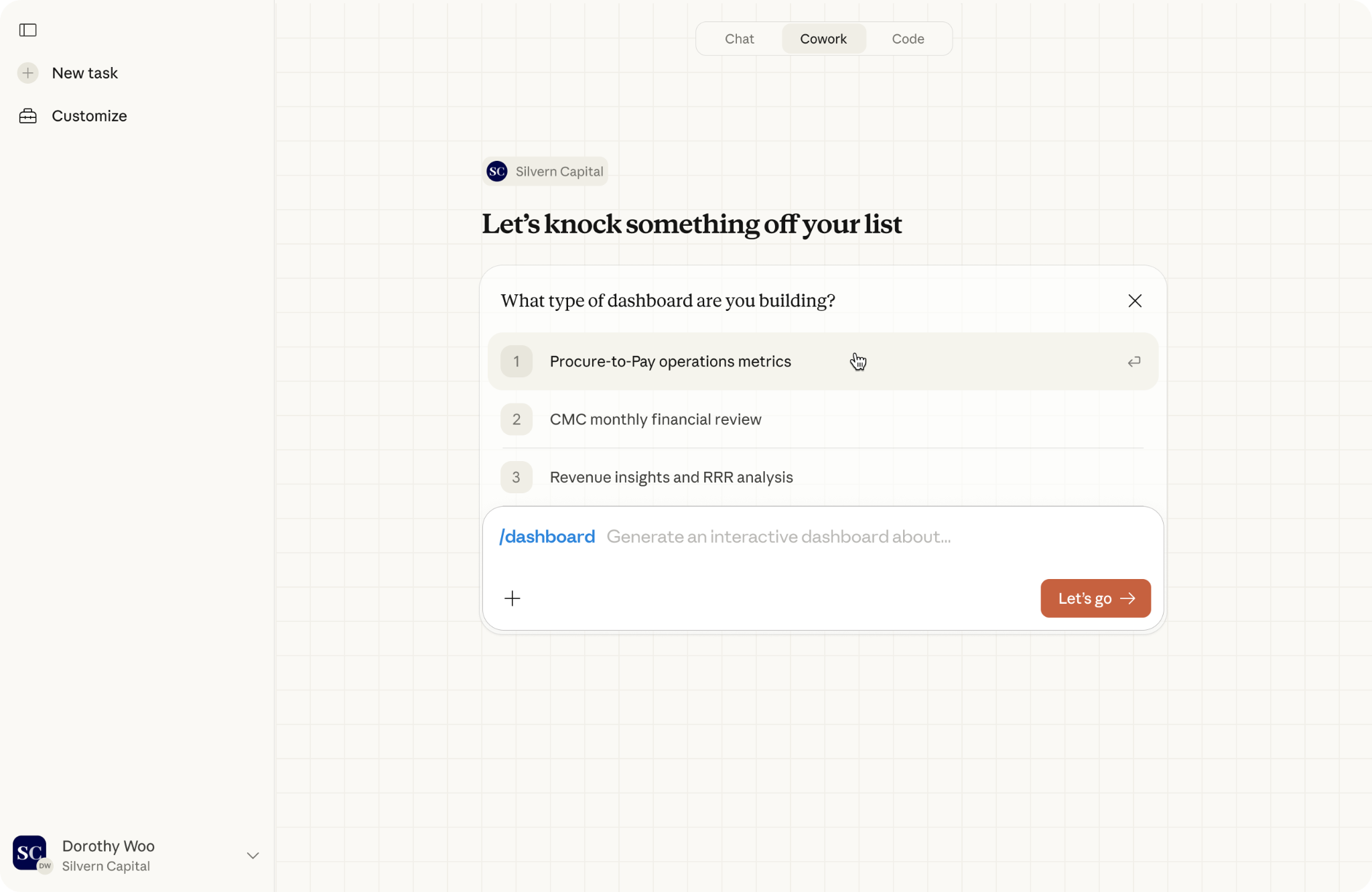
The platform features an intuitive UI where slash commands launch with structured forms for complex workflows. Users simply type /generate report or /dashboard directly into the chat to instantly initiate a multi-step background task without writing long prompts.
Core Concepts: What is the difference between Claude and Cowork?
Separating the model from the workspace
Claude is the underlying artificial intelligence language model designed to process data and generate reasoning. Cowork is the specialized digital workspace built on top of Claude, designed explicitly to execute multi-step tasks and manage long-running enterprise projects.
Moving beyond basic chatbot interactions
While a standard chatbot requires constant manual prompting, Cowork acts as an independent digital employee.
“For two years, the market has been hyping us up about AI agents like they would be digital employees that work around the clock on a specific, discrete workflow. What Anthropic built is so much better.”
— Mark Hines, COO, Blank Metal. [Source: Claude]
Top Plugins Breakdown: What should I use Claude Cowork for?
Financial Analysis Workflows
The finance plugin automates baseline workflows for analysts. It can conduct market and competitive research, build complex financial models, and create PowerPoint templates.
“Three waves have reshaped professional work: productivity tools, cloud and search, and now agentic AI. PwC is partnering with Anthropic to bring enterprise-grade agents into the office of the CFO — making finance teams an even more strategic and valuable function by giving every team member the tools to do more ambitious work, make better decisions, and grow the business in ways that weren’t possible before.”
— Sanjay Subramanian, Anthropic Alliance Leader, PwC. [Source: Claude]
Human Resources (HR) Operations
The HR plugin supports people operations across the entire employee lifecycle. Human resources professionals use this tool to instantly draft official offer letters, build customized 90-day onboarding plans, and run detailed compensation analyses.
Engineering and IT Operations
The engineering plugin streamlines day-to-day software management workflows. It helps developers write daily standup summaries, build deployment checklists, and coordinate live incident responses.
“any engineer can kick off a large-scale migration just by describing what they need in plain English.”
— Kate Jensen, Head of Americas. [Source: Venture Beat]
Investment Banking and Equity Research
The investment banking, private equity, and wealth management plugins are built to handle massive financial datasets. These specialized agents help firms quickly synthesize earnings call transcripts, analyze global market trends, and draft comprehensive investment memos for clients.
Operations and Logistics Management
The operations plugin focuses on improving internal corporate efficiency. Operations teams use this tool to automate supply chain tracking, summarize complex vendor contracts, and generate daily performance reports across multiple departments.
Design and Creative Coordination
The design plugin helps creative teams manage their extensive project pipelines. It assists art directors and designers by automatically generating creative briefs, formatting asset requests, and organizing feedback loops across Adobe Creative Cloud integrations.
Platform Integration: Does Claude Cowork use MCP?
Connecting tools via the Model Context Protocol
Yes, Claude Cowork utilizes the Model Context Protocol (MCP). This standard framework allows the AI to securely connect with your company’s external databases, files, and applications without compromising your enterprise security rules.
Exploring new plugins and connectors

The platform features dozens of new plugins and connectors for enterprise software. New connectors include Google Workspace (Calendar, Drive, Gmail), Docusign, Apollo, Clay, Outreach, Similarweb, MSCI, LegalZoom, FactSet, WordPress, and Harvey.
Does Claude work with Microsoft Teams?
While direct native integration with Microsoft Teams varies by organizational setup, Claude connects deeply with competing communication tools. Claude currently works seamlessly across trusted tools like Slack by Salesforce, Microsoft Excel, and PowerPoint.
Application Orchestration: Can Claude Cowork access the browser and desktop apps?
Working end-to-end across files
Yes, Claude can access external tools and natively orchestrate tasks across desktop software. Claude passes context seamlessly between Cowork, Excel, and PowerPoint across multiple files without restarting when switching applications.
Learn more: Cowork and plugins for teams across the enterprise
Delivering finished products
Because it can control desktop applications, the AI stops acting as a rough drafter and becomes a project finisher.
“Cowork makes it possible for Claude to deliver polished, near final work. It goes beyond drafts and suggestions — actual completed projects and deliverables.”
— Scott White, Head of Product for Claude Enterprise. [Source: Venture Beat]
Setup and Administration: How to use plugins in Claude Cowork?
Building a Claude Cowork plugin marketplace
Administrators can build private marketplaces to distribute specifically approved plugins securely across the organization. This gives IT departments full control over which AI skills are deployed to different teams.
Launching workflows with slash commands
Employees interact with these plugins using simple text commands instead of long prompts. Slash commands launch with structured forms for intuitive workflows; for example, typing /generate report or /dashboard instantly triggers a complex background process.
“We’ve heard loud and clear from enterprises — you want Claude to work the way that your company works, not just Claude for legal, but Cowork for legal at your company.”
— Scott White, Head of Product for Claude Enterprise. [Source: Venture Beat]
Subscription Plans: Claude Team vs Enterprise Access
Is Claude Cowork available for teams?
Yes, Claude Cowork and plugins for teams across the enterprise are available to all Cowork users on paid plans. The deep orchestration feature for Excel and PowerPoint is currently in research preview for all paid plans on Mac and Windows.
What is the enterprise plan of Claude Cowork?
The enterprise plan provides the highest level of administrative control and security. It gives admins ultimate authority over private marketplaces and connectors, ensuring that sensitive corporate data stays protected while employees use agentic workflows.
How much does Claude Cowork cost per month?
Cowork requires a paid subscription, with pricing dependent on whether you select the standard Pro, Team, or custom-priced Enterprise tier.
Common Workflows: What are the best use cases for Claude Cowork?
Organizing and managing local files
Claude Cowork acts as an automated digital archivist. You can point Claude at a messy local folder full of drafts, downloads, and attachments, and instruct it to autonomously rename, sort, deduplicate, or surface whatever files are currently relevant to your project.
Because file systems accumulate faster than anyone can manually organize them, this feature saves massive amounts of administrative time. It allows operations teams to clean up their hard drives without opening and reading every individual document.
Preparing documents from source files
The AI automates the heavy lifting of document assembly and synthesis. Instead of copying and pasting from different tabs, you hand off a set of source files to Cowork, and it produces a structured draft combining all the information.
The hardest part of writing a complex business report is rarely the actual writing—it is gathering the data. By handling the assembly phase, Cowork ensures that the only work left for the human employee is high-level refinement and editing.
Synthesizing complex research
Cowork accelerates the research phase by rapidly analyzing massive amounts of text. You simply share a business question and a set of sources, and Claude instantly identifies exactly what is relevant, returning a clean summary ready for human review.
This matters because reading across dozens of different sources takes time that most professionals do not have. Analysts can use this workflow to digest long industry reports or competitor news in seconds rather than hours.
Extracting data from unstructured files
The AI serves as an intelligent data extractor for dense, unformatted documents. Claude reads through unstructured text like legal contracts, medical reports, or financial records and returns only the information that matters in a clear, digestible, and structured format.
Because business records are naturally dense and difficult to skim, manual extraction is highly prone to human error. Cowork eliminates this risk by accurately pulling out specific clauses, numbers, or dates and dropping them directly into an organized format like an Excel sheet.
Learn more: Claude Cowork by Anthropic
Enterprise Impact: What Professionals Should Know About AI Accountability
Moving from deterministic to probabilistic platforms
Deploying autonomous agents changes how managers must govern their teams.
“The accountability is shifting… Traditionally, we are so used to building deterministic platforms. You write code requirements and build. And now, with AI being probabilistic, the accountability doesn’t end when the project goes live, but on a daily basis, monitoring the behavior and outcomes.”
— Sridhar Masam, CTO of the New York Stock Exchange. [Source: Venture Beat]
Waiting for change management to catch up
Because the technology is advancing rapidly, companies must adapt their training programs quickly to teach employees how to audit AI outputs.
“The tools are in many senses ahead of the change management… And I think it’s 18 months away before that sort of change management catches up with the standard of the tool.”
— Steve Hasker, Thomson Reuters. [Source: Venture Beat]
Broadening the economic scope
As the tools become more integrated across enterprise departments, their financial impact expands.
“The scope of impact is broadening out throughout the economy as the tools and as the technology becomes more capable.”
— Peter McCrory, Anthropic’s head of economics. [Source: Venture Beat]
Community Pulse: What the Community is Saying
Experiencing massive productivity gains

Users are thrilled by the sheer speed of task completion. One user shared: “Let me say this: Claude Cowork is insanely good! It truly feels like an AI assistant capable of a vast array of tasks, some that would take weeks of work completed in less than an hour!”
Enjoying local file privacy and project management

Developers appreciate that Cowork keeps their sensitive workflows localized. A user posted: “This is huge! As an avid Claude Cowork and Code user, Projects is going to transform how I handle bigger coding workflows. All my tasks + context in one focused spot, files stay local on my machine (privacy win!), and one-click import? Instant upgrade.”
Replacing complex terminals with intuitive chats

Non-technical users love the accessible interface. A Reddit user argued against critics: “The terminal is still a barrier for most people. ‘A worse terminal with plugins’ is only a downgrade if you were already comfortable in the terminal to begin with. For everyone else it’s an upgrade.”
Frustration over hardware limitations

Some users are facing restrictive local file limitations. A frustrated developer asked: “Can I use an external drive with Cowork yet? Having it limited to the main disk means it’s useless for my current needs.”
Demanding multi-agent communication

Power users want their different AI tools to talk to each other directly. One user questioned: “when are we gonna have agentic conversation group chats? where my cowork / claude cli can talk to different coworks or cli’s ? similar to team swarms but just regular chats where they communicate to one another with human in the loop or not.”
Action Points — How to use these insights today
- Download the desktop app: Ensure your team is using the Mac or Windows desktop application, as the deep orchestration across Excel and PowerPoint requires local system access.
- Enable MCP connectors: Ask your IT administrator to approve the new Model Context Protocol connectors so your AI can directly read your Google Workspace, FactSet, or Docusign files securely.
- Use slash commands: Stop typing long paragraphs to start a task. Train your team to type /generate report to instantly launch structured forms and save time.
Frequently Asked Questions (FAQs)
1. What is the difference between Claude and Cowork?
Claude is the underlying AI language model, while Cowork is the specialized, interactive digital workspace built to execute multi-step tasks.
2. Is Claude Cowork available for teams?
Yes, it is available for organizations through the Claude Team and Claude Enterprise subscription plans.
3. What should I use Claude Cowork for?
It is best used for time-consuming tasks like financial analysis, market research, drafting HR performance reviews, and formatting PowerPoint decks.
4. What is the cowork plugin?
Plugins are simple, portable file systems that give Claude specific, tailored skills for distinct corporate departments.
5. How to use plugins in Claude Cowork?
Administrators build private marketplaces, and users can access these plugins directly via simple slash commands (like /dashboard) in the chat interface.
6. Does Claude Cowork use MCP?
Yes, it utilizes the Model Context Protocol (MCP) to safely connect with external databases and applications without breaking security rules.
7. Can Claude Cowork access the browser?
Yes, Cowork can orchestrate tasks across the web and securely connect to cloud tools like Google Workspace, Salesforce, and Similarweb.
8. How much does Claude Cowork cost per month?
Cowork is included in paid plans. The exact cost depends on whether your organization selects the Pro, Team, or custom-priced Enterprise tier.
9. Is there a limit on Claude Cowork?
Yes, all AI platforms have usage caps to manage server loads, though Enterprise plans offer significantly higher message and processing limits.
10. What is the enterprise plan of Claude Cowork?
It is a highly secure tier that gives admins control over which plugins are distributed, ensuring corporate data governance is maintained at scale.
11. Does Claude work with Microsoft Teams?
While direct integrations vary, Claude orchestrates deeply with Slack, Google Workspace, Excel, and PowerPoint.
12. What are the best Claude Cowork plugins?
The best prebuilt plugin templates cover HR, design, engineering, operations, financial analysis, investment banking, and equity research.
13. Is Claude Cowork better than Cursor?
Cowork is better for non-developers (like legal or finance teams) because it uses an intuitive chat interface rather than a complex coding terminal.
14. Does Cowork integrate with Microsoft Office?
Yes, Claude can orchestrate across Excel and PowerPoint on Mac and Windows, working end-to-end and passing context between apps.
15. How does this change corporate accountability?
Because AI operates probabilistically, managers must shift from just writing software requirements to actively monitoring the daily behavior and business outcomes of the AI.
Learn more about Anthropic and its AI models
- Anthropic AI Fluency Index: Why Polished Outputs Reduce Critical Thinking
- 3 Ways Claude Opus 4.5 Redefines Software Engineering
- Make the Most of Claude File Creation Feature
- Claude Gov: Inside Anthropic AI for Defense + 6 Risks
Further Reading on Claude Cowork:
Twice a month, we share AppliedAI Trends newsletter.
Get SHORT AND ACTIONABLE REPORTS on AI Trends across new AI tools launched and jobs affected due to AI tools. Explore new business opportunities due to AI technology breakthroughs. This includes links to top articles you should not miss, like this ChatGPT hack tutorial you just read.
Subscribe to get AppliedAI Trends newsletter – twice a month, no fluff, only actionable insights on AI trends:
You can access past AppliedAI Trends newsletter here:
This blog post is written using resources of Merrative. We are a publishing talent marketplace that helps you create publications and content libraries.
Get in touch if you would like to create a content library like ours. We specialize in the niche of Applied AI, Technology, Machine Learning, or Data Science.
Leave a Reply