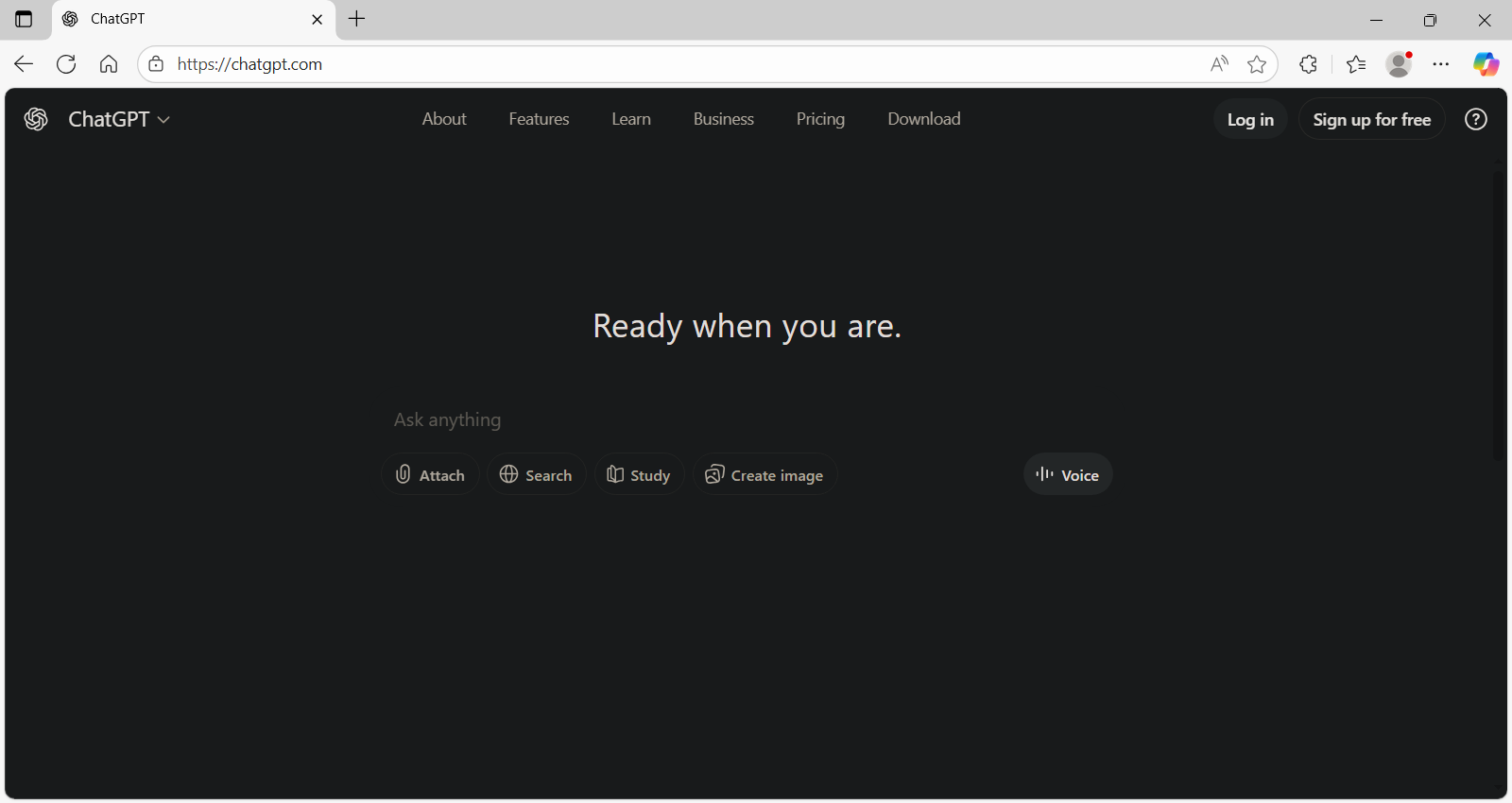
In this guide, we will show you exactly how to use ChatGPT without signup. We will explain what you can (and cannot) do in this mode. Finally, we will answer your most burning questions on using ChatGPT without signup.
This is great for anyone who wants to ask an AI a quick question. They do not want to create yet another account. Maybe you are in a rush, or you just want to try it out without giving away your email info.
For a long time, using ChatGPT meant you had to sign up, create a password, and verify your email. But things have changed! OpenAI, the company behind ChatGPT, has made it easier than ever to use their famous AI assistant chatbot.
The Official Way: Using ChatGPT Instantly
The easiest way to use ChatGPT without an account is through the official website. OpenAI rolled out this feature to make AI accessible to everyone. Here is how to do it:
Step 1: Open Your Browser
Launch your favorite web browser (like Chrome, Safari, or Firefox) on your computer, tablet, or phone.
Step 2: Go to the Website
Type in chatgpt.com (or chat.openai.com) in the address bar and hit Enter.

Step 3: Start Typing
You should see the familiar chat interface immediately. There is no “Sign Up” wall blocking you. Just type your question in the message box at the bottom and hit the arrow button to send it.

Step 4: Read and Reply
ChatGPT will answer you just like normal. You can ask follow-up questions and keep the conversation going.


Note: If the site asks you to log in, try clearing your browser cookies. You can also open the page in an “Incognito” or “Private” window. Sometimes, old data can trick the site into thinking you are trying to log into an old account.
What You Miss Out On (The Trade-Offs)
Using ChatGPT instant access no login limitations is great for speed, but it does come with some restrictions. Since the system doesn’t know who you are, it cannot save your data for you.
Here is what you can’t do without an account:
- Cannot save chat history: Once you close the tab, your conversation is gone forever. You can’t go back and find that recipe or essay outline later.
- Cannot share chats: You can’t create a link to share your funny or interesting conversation with friends.
- Cannot have voice conversations: The feature that lets you talk to ChatGPT like a real person is usually reserved for logged-in users on the app.
- Cannot create custom instructions: You can’t tell ChatGPT to “always answer in short sentences” or “always call me Captain.” It resets every time.
Troubleshooting: Why is ChatGPT Asking Me to Log In?
Sometimes, you might still see a login screen. Here is why that might happen and how to fix it.
- High Traffic: When too many people are using ChatGPT, OpenAI might prioritize registered users. If this happens, you might be forced to log in or wait.
- Suspicious Network: If you are using a VPN or a public Wi-Fi network, ChatGPT might think you are a “bot.” It could then ask you to log in to prove you are human.
- Strict Settings: Some regions or browsers have strict security settings that interfere with the “guest” mode.
How do I stop ChatGPT from logging in?
If you are stuck in a loop, try these tricks:
- Turn off your VPN: This is the most common fix.
- Use a different browser: If Chrome isn’t working, try Edge or Firefox.
- Try an alternative: If the official site is being stubborn, you can use alternative AI tools like ChatGPT without login. Search engines like Bing (Copilot) allow you to chat with GPT-4 technology without always needing a strict account setup.
Is it safe to use ChatGPT without login?
Yes, it is generally safe. Still, OpenAI still keeps track of some information to keep the system safe. They may log your IP address (which shows roughly where you are) and the content of your messages.
Important: By default, OpenAI may use your chats to train their AI models, even if you are not logged in. If you share personal secrets, the AI might “learn” from them. Always be careful not to share private details like passwords, addresses, or phone numbers.
Guest Mode Mastery: Hacks for Speed and Privacy
Using ChatGPT without an account isn’t just for beginners it’s a powerful strategy for privacy and speed. Here is how to make the most of the “Guest” experience.
- The Ultimate “Medical” Mode: When you chat without logging in, your history is not saved to a permanent profile. This creates a perfect safe space. You can ask sensitive medical or personal questions. These questions won’t attach to your main identity.
- Turn Off Training (Even as a Guest): You don’t need an account to protect your data. Click the little “?” or Settings icon in the bottom-right corner, go to Settings, and uncheck “Improve the model for everyone.” This stops OpenAI from using your anonymous chats to train their AI.
- The “Screenshot Rule”: Warning if you refresh the page or close the tab, your conversation is gone forever. There is no “History” sidebar for guest users. Always copy-paste your important answers into a note app or take a screenshot immediately.
- Bypass “Context Clutter”: sometimes, your main account gets “stuck” remembering old custom instructions. Open a fresh, logged-out window to get a true “blank slate.” This helps to test how the AI responds to a prompt without any bias or previous context.
- Know the Restrictions: Be aware that “Guest” access is strictly for text. You can’t generate images (DALL-E), use Voice Mode, or create Custom GPTs without signing in. Use this mode primarily for quick text answers and code debugging.
Frequently Asked Questions (FAQs) on using ChatGPT without login
Here are answers to the most common questions about using ChatGPT as a guest.
Can I use ChatGPT without signing up?
Yes! You can go directly to chatgpt.com and start chatting immediately. You do not need to give an email address or password for basic conversations.
Why is ChatGPT forcing me to log in?
This usually happens if their servers are very busy. It can also occur if your internet connection looks suspicious, like if you are using a VPN. It helps them prevent spam and attacks on their system.
Is login necessary for ChatGPT?
No, login is not necessary for basic tasks like writing emails, summarizing text, or asking questions. Login is necessary to save your history. You also need it to use advanced models like GPT-4o. Additionally, login is needed to generate images with DALL-E.
Is it legal to use ChatGPT without an account?
Yes, it is perfectly legal. OpenAI officially supports this feature to make their tool easier to access for everyone.
Can no longer use ChatGPT without login?
You might suddenly find that you can’t access it without logging in. This could be a temporary glitch. Alternatively, there might be a policy change in your specific region. Try refreshing the page or checking back later. As of now, the feature is still active for most of the world.
Is it safe to use ChatGPT without an account?
It is safe for your device, but remember that your chats are not private. OpenAI can still see what you type to improve their service. Never type sensitive personal information into the chat.
Can I generate images (DALL-E) without signing up?
Usually, no. Basic text chat is open to guests. But, advanced tools like DALL-E 3 image generation typically need you to sign in to a free account. If you try to ask for an image as a guest, the system will likely prompt you to “Log in to continue”.
Does ChatGPT allow Voice Mode without an account?
No. The “Advanced Voice Mode” (where you talk to the AI) is currently reserved for logged-in users on the mobile app. Guest users on the web browser can only type text.
Will my “Guest” chats be used to train the AI?
Yes, by default. Even if you don’t have an account, OpenAI uses anonymous chat logs to improve their models. You can opt out of this. Go to Settings > Data Controls. Disable the training option, even without logging in.
What happens if I accidentally close my tab?
Your chat is lost instantly. Unlike logged-in users who can go to their “History” sidebar to find old conversations, guest sessions are temporary. Once the browser session ends, the data is wiped from your view.
Check out more ChatGPT Hacks on AppliedAI Tools
Make the most of ChatGPT for your personal or workplace productivity:
- ChatGPT for Daily Morning Routine Cheat Sheet
- How to Use ChatGPT with Canva for Instant Designs
- 4 ChatGPT Prompts To Find Discount Coupon Codes
- Learn English Using ChatGPT — Free AI Language Tutor
- How to Make ChatGPT Forget Memory?
- ChatGPT For Free Personal Color Analysis – Prompts and GPTs
- How to use ChatGPT on WhatsApp in 3 steps
- How To Digitize Handwritten Notes with ChatGPT For Free
- Claim ChatGPT Go Free in India: Features and Reviews
- 5 ChatGPT Parental Controls: OpenAI Age Detection Tech Explained
- How OpenAI Critterz Makes Filmmaking Accessible To Independent Animators
- Use ChatGPT Projects Feature For Free [Tutorial with Example]
- Best AI Browsers: Free Comparison Business Analysis Report
- ChatGPT Search Upgrade: Shopping Without Login
Twice a month, we share AppliedAI Trends newsletter.
Get SHORT AND ACTIONABLE REPORTS on AI Trends across new AI tools launched and jobs affected due to AI tools. Explore new business opportunities due to AI technology breakthroughs. This includes links to top articles you should not miss, like this ChatGPT hack tutorial you just read.
Subscribe to get AppliedAI Trends newsletter – twice a month, no fluff, only actionable insights on AI trends:
You can access past AppliedAI Trends newsletter here:
This blog post is written using resources of Merrative. We are a publishing talent marketplace that helps you create publications and content libraries.
Get in touch if you would like to create a content library like ours. We specialize in the niche of Applied AI, Technology, Machine Learning, or Data Science.
Leave a Reply